

Your team in one account — each person sees their part
A cash-on-delivery seller doesn’t work alone: there are people who confirm orders, people who chase parcels, people who pack in the warehouse and people who pay suppliers. Hi Mico gives each of them a role and permissions, so everyone works in the same account and no one sees what isn’t theirs.
Ready-made roles — or one you design
You get fixed roles for the trade: a confirmation agent who confirms but doesn’t track, “Confirmation & tracking”, “Tracking only”, order operator, warehouse worker, logistics operator, finance, media buyer for ads, courier, and manager or partner.
If a job doesn’t fit any of them, you create a role, name it and pick its permissions from a matrix.
Each person sees what concerns them
Permissions are enforced in the database itself, not just on screen. A confirmation agent sees their orders and the stock quantity available, without purchase costs or profits. A warehouse worker packs from a view that contains neither the unit cost nor the order’s loss. A media buyer sees their campaigns and pages, not orders. Finance pays suppliers without entering inventory.
Everyone’s pay, calculated on its own
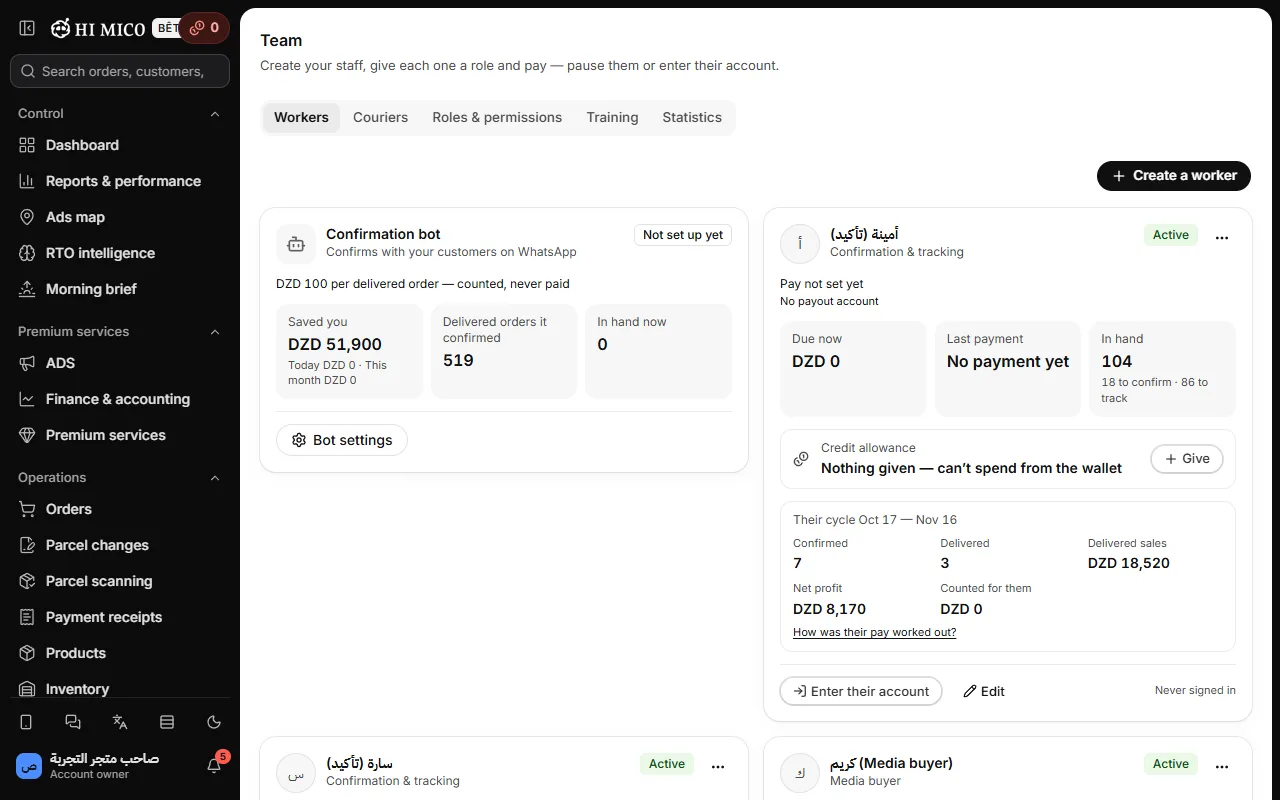
You choose how each member is paid: an amount per confirmed order, per delivered order or per parcel shipped, a monthly salary, a salary plus a bonus per delivered order, or a share of your profits — and for a media buyer, a share of their campaigns’ profit. What is owed is calculated automatically and you record your payments. You see it on the member’s card: what is owed now, the last payment and the orders they are handling.
Couriers and the confirmation bot
Couriers have their own tab in Team: you add each one, they record deliveries and attempts from their phone, and their bonuses are calculated. The WhatsApp confirmation bot shows up in the team like a member: you see what it confirmed, what it is handling right now and what it saved you compared with paying an agent to confirm by hand.
First day and performance
On their first sign-in, a new member goes through training, then the work contract, then their payout account. “Statistics” measures each person’s confirmation speed, from the order reaching them to their decision. Each member’s card shows their cycle: confirmed, delivered, delivered sales and net profit.
You can enter any member’s account to see what they see; everything you do there is logged under your name.
Frequently asked questions
Does a confirmation agent see all orders?
No. They see the orders assigned to them, and distribution assigns each new order to one of the members who are online.
Can one person both confirm and track?
Yes, the “Confirmation & tracking” role combines both. The “Confirmation agent” and “Tracking only” roles separate them for sellers who want two teams.
Do delivery workers use the platform?
A delivery worker doesn’t see the seller’s screens: they have a page on their phone with their parcels, where they record deliveries and attempts.
Can I deactivate a member who left?
Yes. You deactivate their account: their session ends on their next request and they can’t sign in again, while their work stays in the history.
Do I choose what each role can see?
Fixed roles come with permissions set for their job; for a role you design, you pick permissions one by one from the matrix. The manager or partner has every permission.