

Cash-on-delivery orders and their confirmation, in one place
In cash on delivery, an order only counts once the customer confirms it and receives it. Hi Mico gathers your orders from every source, puts them in front of the person who confirms them, keeps a record of every call and follows each one until it is delivered or returned.
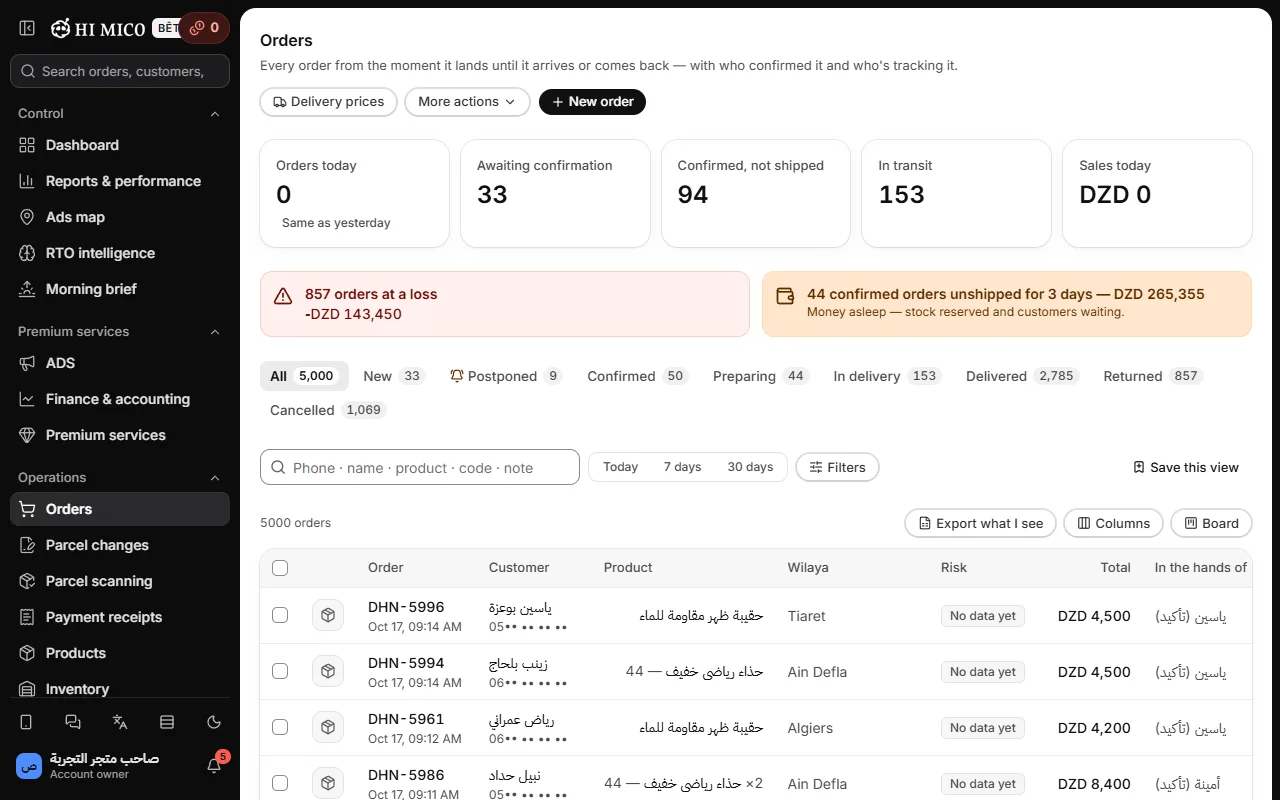
Every source in one list
Orders come in on their own from your store and the landing pages you build in Hi Mico, from Shopify, WooCommerce, YouCan and LightFunnels, from Facebook lead forms and Google Sheets, and from your own website through an intake endpoint for developers. You can also add them by hand, or import an Excel file and see what was read before anything is saved.
Every order has a clear status: new, postponed, confirmed, preparing, out for delivery, delivered, returned or cancelled. You search by phone, name or product, save your filters as a view you open in one click every morning, and show the list as a table or a board.
Today’s numbers in front of you
At the top of the list you see today’s orders, those waiting for confirmation, confirmed orders not yet shipped, those on the way and today’s sales. The platform flags confirmed orders that have waited too long before shipping and the orders you are losing money on, so you know where to start your day. You also see the confirmation and delivery rates for the last 24 hours.
Confirmation by phone — every attempt logged
The confirmation agent opens the order, calls the customer or messages them on WhatsApp, then records what happened: confirmed, no answer, busy, asked to postpone, wrong number, or refused with the reason. The callback time postpones the order by itself until it is due, and a confirmed order reserves its stock.
On a phone, an order is confirmed straight from its card without opening the details. The platform also warns you about a duplicate order, and about a customer you blocked with the reason you wrote, before you ship.
Shared out to the team without waiting
Every order is born with someone in charge of it: in rotation, by workload, by performance, by wilaya, by source, by product or by shift schedule. When someone is away, their new orders move to a colleague who is online, and each person only sees their own orders.
If you connect your number to the WhatsApp bot, it confirms orders with your customers from your number. A duplicate order it does not confirm: it leaves it to you.
From confirmation to delivery
Once confirmed, the order is sent to the delivery company from the platform. Its status follows the parcel’s, and its history keeps everything the carrier said: delivery attempts, driver comments, and the driver’s number when the carrier provides it. You export what you see to a file and print your shipping slips.
Frequently asked questions
Can I import my orders from Excel?
Yes. Save your file as CSV or download the template and fill it in. Hi Mico reads it, shows you the rows before saving, and tells you which column is missing if one is.
Does the confirmation agent see my profits and purchase costs?
No. A confirmation agent sees the orders assigned to them, without the purchase cost of the products or your profits. You choose the permissions of each role.
What happens to a postponed order?
The agent picks a callback time, such as in an hour, this evening or tomorrow morning, and the order comes back to them when it is due.
How do I know an order is a duplicate?
It carries a “Likely duplicate” badge when the same phone orders the same product while another order is still open, so you decide before shipping twice.